What is EOS Connect?
Software you run at home that decides, hour by hour, when your battery should charge, hold or discharge — and then makes it happen.
How it works
EOS Connect sits between the things that measure your house and the things that control it. Every few minutes it runs the same four steps.
- Collect. It builds a load profile from your historical consumption — days of it, not a single reading — and reads the things that only matter right now, such as battery charge level and whether a car is charging. Sources are Home Assistant, openHAB, EVCC or the inverter itself.
- Forecast. It fetches the next 48 hours of solar yield and electricity prices.
- Optimise. It works out, slot by slot, the cheapest way through those 48 hours — when grid electricity is worth buying, when solar should be stored rather than exported, and when the battery should carry the house.
- Control. It writes that decision to your battery inverter — directly, or through EVCC acting as the gateway — and shows you the plan it is following. It never commands your wallbox; what the car is doing is an input it works around, not something it takes over.
A new plan is worked out on the quarter hour, and the plan in force is applied continuously in between. Plans are built in hourly slots; 15-minute slots are available with either EVopt backend.
The optimizer
The part that actually decides is the optimizer, and EOS Connect ships with one.
No external server is required. The setting is
eos.source, and its default needs nothing installed.
Local EVopt — the default
local_evopt runs inside EOS Connect. It solves the whole
48-hour plan at once rather than deciding hour by hour, using a technique
called mixed-integer linear programming. Nothing leaves your network, and
it handles both hourly and 15-minute slots. Built on
evcc-io/optimizer.
Akkudoktor EOS
eos_server talks to
Akkudoktor EOS, which you install and run yourself
(port 8503 by default). Hourly slots only. This is the one backend that
uses the outside-temperature forecast.
EVopt
evopt talks to a separate
EVopt server (port 7050 by default). Lighter than
Akkudoktor EOS, and it handles 15-minute slots.
Both external backends are entirely optional. You can start on the built-in one and switch later — it is a single setting, not a reinstall. Optimizer settings
What you need
Less than you might expect. A fresh install starts and runs with nothing configured: it falls back to a built-in load profile, a demo solar curve for a typical 4 kW array, and market prices from Akkudoktor. That gets you a working dashboard in minutes. It does not get you savings — for that, the list is:
- Somewhere to run it. The Home Assistant add-on, Docker, or Python 3.13 from source.
- A battery and an inverter it can drive. Without one, EOS
Connect still forecasts and plans, but the plan is only advice — the
inverter setting stays at
default, which displays and controls nothing. - Live measurements. Home Assistant or openHAB supplying your actual household load and battery charge level. This is the single change that most improves the results.
- A dynamic electricity tariff. Optimising against a flat rate has very little to work with.
- EVCC, if you charge a car and want the car and the house battery to stop bidding for the same cheap hour.
On first start a setup wizard walks through these in order, asking only what your earlier answers make relevant — say you have no data source and it stops asking about sensors. It saves only the answers it asked for; everything else keeps its default until you change it. There is no configuration file to edit.
Handled for you
A few things EOS Connect does on its own, or behind a single switch.
PV forecast auto-scaling
Compares the forecast against your metered yield and corrects the next one, separately for four blocks of the day. Needs a cumulative PV generation sensor. Details
Smart Price Prediction
When your tariff has not published tomorrow yet, it learns how your prices relate to the spot market and projects that forward, instead of repeating today. Details
Dynamic PV override
In any slot where the solar forecast exceeds your load, it can release the battery to discharge even though the plan said hold. Details
Temperature forecast
The outside-temperature curve is fetched hourly and handed to the optimizer, which models the house more accurately with it. Akkudoktor EOS backend only.
Backup and restore
One file holding the whole install — settings plus the measured PV history, which is kept on a rolling window and stored nowhere else. A restore always previews before it applies. Details
Battery energy costing
It tracks what the energy already in your battery cost to put there, so it will not sell cheaply what it bought expensively. Details
What it talks to
Measurements
Home Assistant or openHAB for load and battery sensors, EVCC for car and charger state. Each sensor field has a Test button that reads the entity and shows its value, so a typo is caught before you restart.
Inverters
Fronius GEN24 (current and legacy interfaces), Victron, any inverter
reachable through Home Assistant service calls, or EVCC as a gateway.
Leave it at default to watch without controlling.
Solar forecasts
Akkudoktor, Open-Meteo (hosted or local), Forecast.Solar, Solcast, Victron, EVCC, your own time series, or the built-in demo curve. Several arrays at different orientations are added together.
Prices
Tibber, smartenergy.at, Stromligning, EVCC, a fixed 24-hour curve or your own series. Export prices come from a fixed rate, Elpris DK, EPEX Spot or EVCC.
EV charging
EOS Connect reads EVCC — several instances at once, if you run them — so the house battery is planned around what the car is doing. Charging itself stays EVCC's job.
Everything else
MQTT with Home Assistant auto-discovery, the same topics for openHAB through its MQTT binding, and a REST API if you would rather drive it yourself. API and MQTT reference
The dashboard
Everything lives in one web page, served on port 8081. The centre of it is a chart of the next two days: forecast solar, forecast load, the price curve, and the mode EOS Connect intends to run in each slot. When it decides to buy grid electricity at three in the morning, that chart is where you see why.
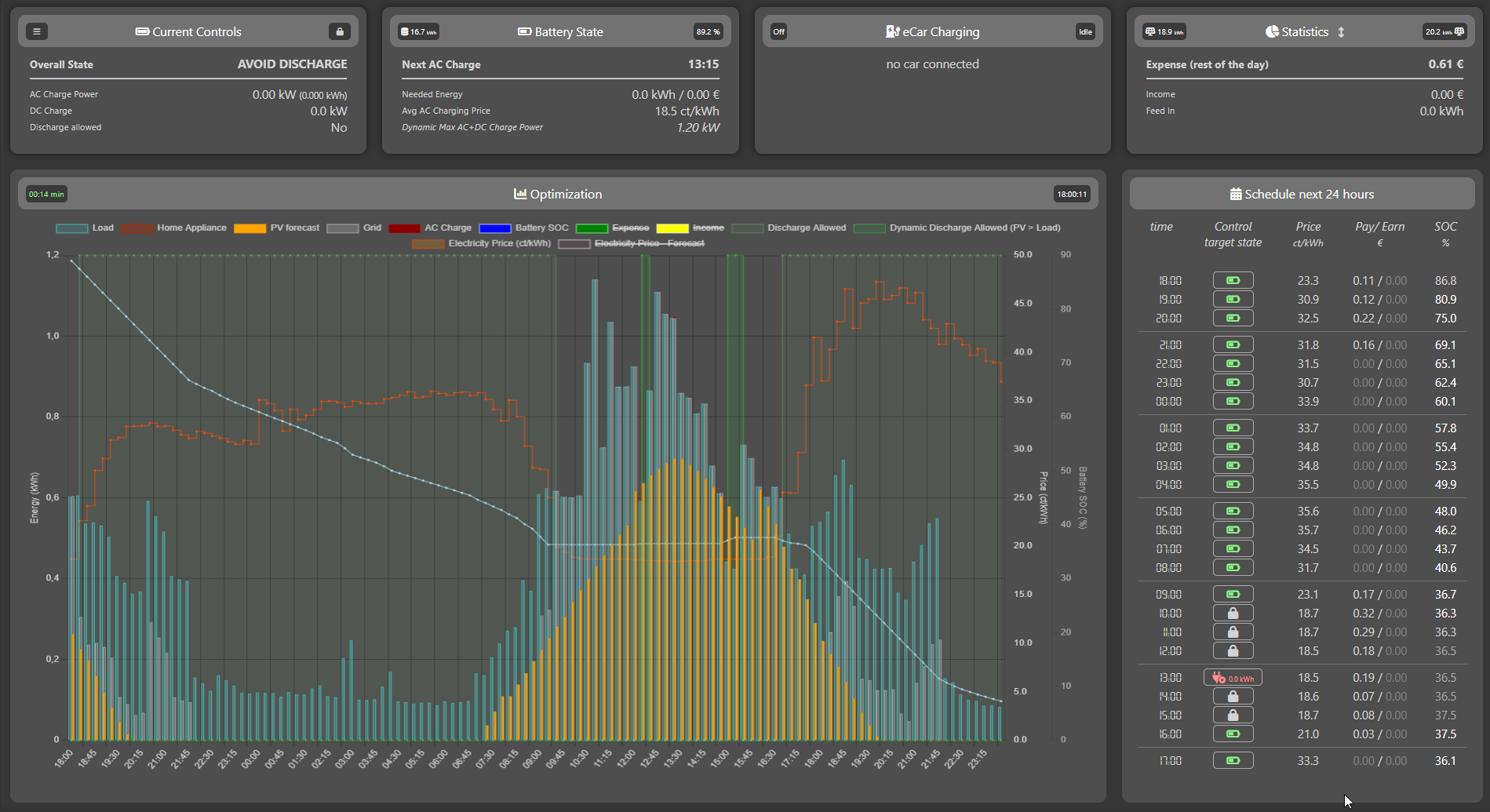
The menu adds a battery overview with charge sessions, temperature and cost; override controls for taking over manually; alarms and a filtered log viewer; the full settings pages; and backup and restore. Nothing needs a terminal.
Docker installs also check for new images in the background and show a dismissible banner when one is available. Home Assistant add-on updates are handled by Home Assistant. Update notifications
Next steps
Still deciding? EOS Connect is MIT-licensed and developed in the open — read the source or ask in Discussions before you install anything.